
This is a collection of Social Studies resources that can be used for classroom activities and some examples of how these resources can be used.
Google Maps
Google Maps has many great features. You can measure distances between different places, create custom maps, view places from satellite images, view places at street level, and do many other things. Below is a map I made while working on a project on Minnesota history. Mostly, I just added placemarks to the map and added notes about what happened there. The box on the map is the approximate boundaries of the land ceded by the Sioux to the United States in the Treaty of St. Peters. By finding places on the map and making notes about the historical events that took place there, I gained a much better understanding of the relationship between the history and geography of Minnesota, and it was a really great way to visualize the information.
View Minnesota History in a larger map
Google Earth
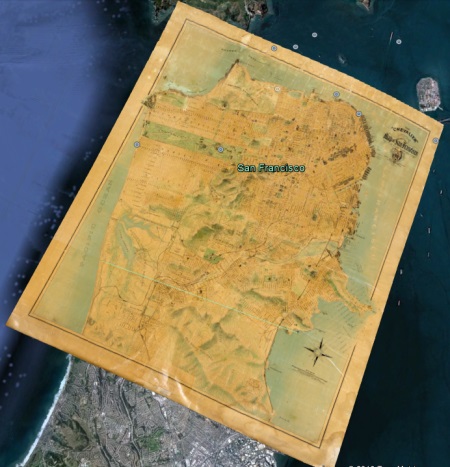
Google Earth is another great geography resource. Google Earth incorporates information from numerous sources and gives users the option to view different layers. The Rumsey Historical Maps layer is really interesting. With this feature, you can view historical maps over modern places. It is a great way to see how cities have changed (or not changed) over time. Below is a map of San Francisco from 1915.
Google Drive
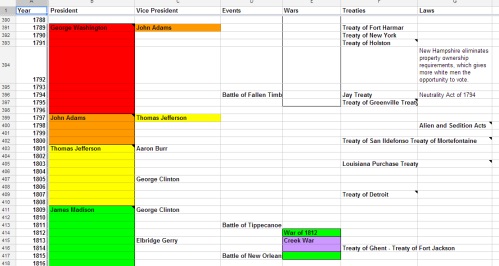
OK-one more resource from Google... Google Drive is an online resource where you can create spreadsheets, documents, and presentations. I am most familiar with their spreadsheets. While the spreadsheets app does not have the same number of features found in Microsoft Excel, users do have the ability to make basic spreadsheets and are able to share them with others. While I prefer Excel, the spreadsheet app on Google Docs is a nice alternative if Excel is not available. One way I have used the spreadsheet app is to create a timeline. I put a list of years in the first column, and then added different titles in the top row. The timeline below has different events from U.S. history. I included columns for President, Vice President, Events, Wars, Treaties, and Laws. You could enter as many columns as you wanted. By creating a timeline such as this, students would have the ability to see connections between a variety of different events. Click on the image below to see the timeline.
Other Resources
These are some suggested sites for Social Studies resources on the Internet.
- The CIA World Factbook: This is a great reference for statistics for every country in the world. Categories include population, government, economy, and many others. The site also has numerous maps and includes some photos.
- U.S. Department of State Milestones: This site provides a good overview of important events in U.S. foreign policy.
- Our Documents - 100 Milestone Documents: An excellenct resource for primary sources, this site has background information, transcripts of documents, and images of significant documents in U.S. History.
- Ben's Guide to U.S. Government for Kids: Another site published by the U.S. government, the purpose of this site is to educate children from Kindergarten through High School on how the U.S. government works.
- iCivics: Founded by Justice Sandra Day O'Connor, iCivics aims to increase student's understanding of our government and be active participants in the democratic process. The site includes games and engaging classroom activities.
Fun Stuff
- Strange Maps: a collection of odd maps- definitely a different way to look at the world
- Placespotting: an online game utilizing Google Earth, users are shown an image and must zoom in on the map to find the correct spot and solve the puzzle
- Sheppard Software: If you can't locate all of the U.S. states or countries of the world, head on over to the Geography section on the Sheppard Software site. There are games for all areas of the world and multiple difficulty levels.
- Mission U.S.: a U.S. History-based simulation game